
What DCJ needed
Carer Connect NSW is a web portal and app for authorised foster, relative and kinship carers. Ahead of the launch, DCJ asked us to make a video explaining what it offered and how to use it.
DCJ’s brief noted that carers were busy and had varying levels of confidence with technology. We needed to explain the steps without assuming everyone was comfortable finding their way around a new app.
We planned a walkthrough using recordings of the portal, with a voiceover explaining what to do on each screen. It would cover signing in, updating information and finding resources or help.
Who could use each feature
Some features were available to all carers; others were specifically for foster carers. We explained this at the start of the video so people knew which sections applied to them.
All carers could access news and resources. Foster carers could also update their household details, availability and caring capacity. Keeping that information current helped caseworkers and agencies understand the household’s circumstances. The script made clear that they would still discuss placements with the carer.
We followed the order someone would use the portal, starting with sign-in and the Home screen. The video then covered household information before moving on to resources and help.
The script and storyboard
We reviewed DCJ’s communications material and walked through the portal with the team before writing the script.
The storyboard set out the voiceover beside a visual reference and instructions for what would happen on screen. The client could read the narration and check the matching screen at the same time.
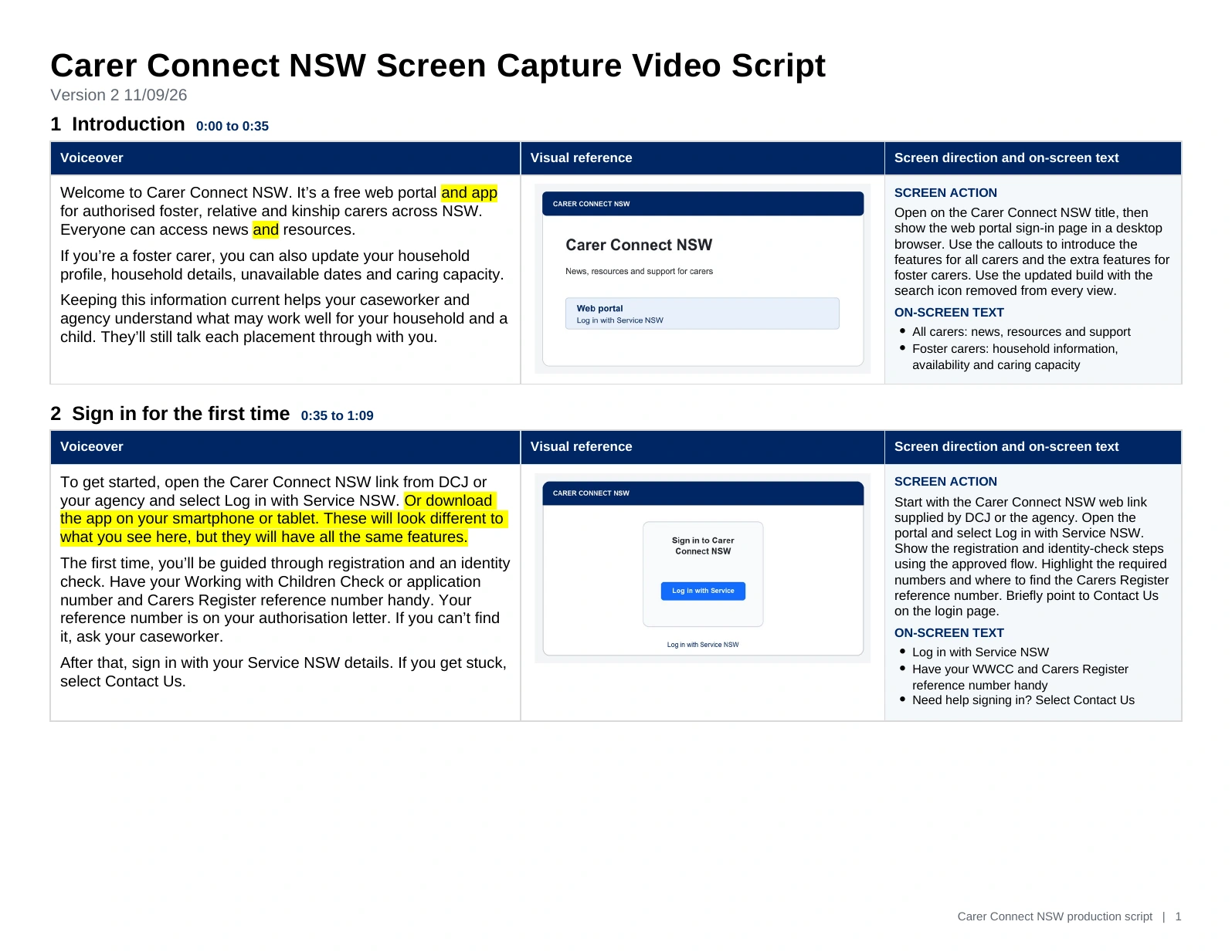
The sign-in section, for example, reminded carers to have their Working with Children Check and Carers Register details handy. Alongside the narration, we showed the login screen and noted where to point out the help option.
DCJ could check the wording and screen sequence before we recorded the final voiceover and finished the animation.
Recording and animating the screens
We recorded the portal and added zooms, text and callouts to show viewers where to look. When the narration referred to a button or field, we brought that part of the screen closer.
The video used the supplied Carer Connect illustrations and campaign colours, with the NSW Government graphic at the end.
For more on how we plan and record software demonstrations, see our screen capture video production guide.
Recording the voiceover
The client wanted an Australian female voice. We asked the voiceover artist to take viewers through each step calmly.
We edited with a temporary voiceover first. Once the client had approved the edit, we recorded the professional voiceover and replaced the guide track.
The finished video runs for about six minutes. We allowed time for viewers to follow each screen and read the information being discussed.
Changes before launch
The portal was still being updated during production. We animated replacement screenshots for the login sequence and revised the Noticeboard and Help sections to match the latest version.
The privacy review included obscuring names, contact details and dates of birth in the demonstration screens. The masks needed to stay in place as we moved around the screen or zoomed in.
We also supplied the approved narration script to DCJ’s digital team for captioning.
The finished video
DCJ published the video on its Carer Connect NSW page alongside its other getting-started information. Carers can watch it before signing in or return to a section when they need a reminder.
If you need a video to explain your app or software, get in touch or read about our training video production service.